Actual Multiple Monitors 8.10
Actual Multiple Monitors clones the Windows Taskbar, Start button, system tray and the Alt-Tab Task Switcher on secondary monitors, and also offers new multi-monitor window management services, such as switching windows between monitors in a flash.
Product Specifications
| User Rating: | item has less then 1 vote |
|
| FileCart Rating | Not yet Rated | |
| Submitted by: | actualtools | |
| Homepage | Visit Homepage | |
| License | Shareware | |
| Expires | 30 Days | |
| Price | $24.95 | |
| Downloads | 1,318 | |
| OS Support | Windows Install and Uninstall | |
| File Name | ammsetup.exe | |
| File Size | 9.96 MB ( 10,202 KB ) | |
| Published | Jul 01, 2010 (14 years ago) | |
| Updated | Mar 03, 2017 (7 years ago) | |
Follow Us!
Latest Searches
elvis live counter 3 hours ago
Net Monitor for Employees Professional 9 hours ago
GCulvert 9 hours ago
wise registry cleaner portable 15 hours ago
2024 16 hours ago
2025 2 days ago
universal soccer 2 days ago
Quick Receipt Software 2 days ago
autocad portable 2 days ago
Popular Searches
Database Workbench Pro 258 times
TeraByte Drive Image Backup and Restore 255 times
Elcomsoft Phone Breaker 251 times
Elcomsoft Phone Viewer 232 times
Softperfect 230 times
SAM Broadcaster Cloud 223 times
BootIt Collection 223 times
YetiShare File Hosting Script 207 times
Antamedia HotSpot Software 205 times
Product Details
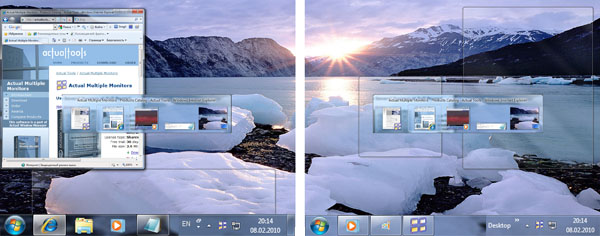
Powerful yet easy-to-use, the program adds a copy of the original Windows Taskbar onto each secondary display, simplifying and unifying the task management on all monitors. Each such copy can either display only the tasks running on the same monitor or mirror the contents of main Taskbar. Moreover, each secondary taskbar can display the Start button, the notification area (system tray), any toolbars (like Quick Launch, etc.) and the clock. Also, you can clone the Alt-Tab Task Switcher window on each monitor to get rid of turning your attention to the primary monitor every time you need to switch tasks. Finally, all taskbars can be semi-transparent!
Actual Multiple Monitors greatly enhances window management within the expanded screen space with such usability tools as quick switching windows between monitors via special button in each window's title bar or via hotkeys, easy dragging/sizing windows by an arbitrary point, snapping windows to desktop boundaries and to each other (sticky borders), emulation of Windows 7 Aero Snap on XP/Vista, making any window span the entire desktop or fit monitor's width/height - and many others!
To make your work environment even more comfortable and efficient, Actual Multiple Monitors offers setting up rules for your favorite apps to choose which monitor displays the program at startup. You can also create desktop profiles, which include such display properties as screen resolution, refresh rate, color depth, status (primary or secondary), the type of wallpaper and screen saver (shared or individual on each display). Last but not least - the program can save and restore the order of icons on your desktop in case they were garbled in some way.
Try Actual Multiple Monitors right now - and it will make arranging multi-monitor setups a breeze!
| Requirements: | P-III 600+ CPU, 128+ Mb RAM, 30+ Mb free space on HDD |
| Release Info: | Minor Update on Dec 29, 2016 |
| Release Notes: | 1) Fixed title buttons in colored title bars in Windows 10. 2) Improved stability on 64-bit systems. 3) Restored title buttons compatibility with Microsoft Office and Google Chrome. 4) Fixed incompatibility with F-Secure. 5) Improved compatibility with high DPI resolutions. |
| Related Tags: | multiple monitor display screen multi-monitor |
Reviews
Reviews of Actual Multiple Monitors 8.10
You can be the first to write a review of Actual Multiple Monitors!Other products submitted by this publisher
Actual Title Buttons is a suite of the most essential tools added to the title bars of windows once installed, with many exciting functions for windows control: minimize them to tray, set up priority, apply transparency, keep always-on-top, and more!
Actual Transparent WindowActual Transparent Window offers new ways of working with multiple windows: it lets you easily set and vary transparency level of any window, either manually via title button or automatically depending on a window state (active/inactive/moved/etc.).
Actual Virtual DesktopsCreate an activity-focused work environment - scatter the piled up application windows over independent desktops, showing one desktop at a time. Move windows between desktops, set custom wallpapers, automatically maintain your workspace using rules.
Actual Window ManagerActual Window Manager is a suite of over 50 innovative tools, letting users change their interaction with windows in many new exciting ways: minimize windows to tray or to an icon on the desktop, apply transparency, roll up, pin on top, resize, etc.
Actual Window MenuActual Windows Menu is a suite of the most essential tools for versatile windows control: minimize them to tray, set up priority, keep always-on-top, apply transparency, etc. Once installed, the extra options are added to each window's system menu.
Most Viewed Windows Startup Managers
EF StartUp Manager 18.03
Chameleon Task Manager Lite 4.0.0.776.9
Chameleon Task Manager Pro 4.0.0.776.9
Actual Multiple Monitors 8.10
9Desks 1.8
Mobile Spy Software 2.0.1.5
Actual Window Menu 8.11.1
Simple Startup Manager 1.16
Arrange Startup 3.7